Search K
Appearance
👍欢迎大家积极投稿交流👍
如果文档内容陈旧或者链接失效,请发现后及时同步,我将尽快修改
👇微信👇

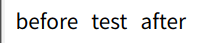
before 在元素内容的前面插入指定的内容.
after 在元素内容的前面插入指定的内容.
selector::before {
  /* 样式 */
}
selector::after {
  /* 样式 */
}<div class="box">test</div>.box::before {
content: 'before';
margin-right: 10px;
}
.box::after {
content: 'after';
margin-left: 10px;
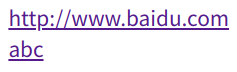
}<a class="link1" href="http://www.baidu.com"></a><br />
<a class="link2" href="http://www.baidu.com" id="abc"></a>.link1::after {
content: '' attr(href) '';
}
.link2::after {
content: '' attr(id) '';
}<i class="icon"></i>.icon::after {
content: url(https://img.cdn.sugarat.top/mdImg/MTU4MjExNzE5MjM3Ng==582117192376);
width: 20px;
height: 20px;
display: block;
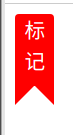
}<div class="mark">标<br />记</div>.mark {
width: 30px;
height: 55px;
color: #fff;
border-radius: 3px 3px 0 0;
background-color: red;
text-align: center;
position: relative;
&::after,
&::before {
position: absolute;
content: '';
display: block;
border: 15px solid transparent;
}
&::after {
right: 0;
border-right: 15px solid red;
bottom: -15px;
}
&::before {
left: 0;
border-left: 15px solid red;
bottom: -15px;
}
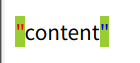
}<div class="code">content</div>.code {
margin-top: 20px;
&::before {
content: '"';
color: red;
}
&::after {
content: '"';
color: blue;
}
&:hover {
&::before,
&::after {
background-color: yellowgreen;
}
}
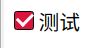
}<label for="moreAction">
<input id="moreAction" type="checkbox" />
<span class="fw-checkbox"></span>
<span>测试</span>
</label>#moreAction {
display: none;
}
.fw-checkbox {
position: relative;
display: inline-block;
box-sizing: border-box;
width: 15px;
height: 15px;
border: 1px solid #000;
border-radius: 2px;
}
#moreAction[type='checkbox']:checked {
+ .fw-checkbox {
background-color: crimson;
}
+ .fw-checkbox::before {
position: absolute;
display: inline-block;
content: '';
width: 6px;
height: 10px;
border-right: 2px solid #fff;
border-bottom: 2px solid #fff;
transform: rotate(45deg);
left: 3px;
bottom: 3px;
}
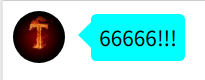
}<div class="bubble">
<img
src="https://img.cdn.sugarat.top/mdImg/MTU3OTY5OTUwMDM1Mw==579699500353"
alt=""
/>
<div class="chat">66666!!!</div>
</div>.bubble {
display: flex;
align-items: center;
img {
width: 40px;
height: 40px;
border-radius: 50%;
margin-right: 20px;
}
.chat {
position: relative;
background-color: cyan;
padding: 6px;
border-radius: 4px;
box-sizing: border-box;
&::before {
content: '';
position: absolute;
left: -20px;
border: 10px solid transparent;
border-right: 10px solid cyan;
}
}
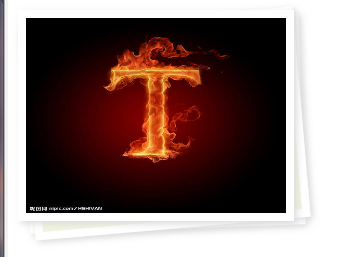
}<div class="img-area">
<div class="pic">
<img
src="https://img.cdn.sugarat.top/mdImg/MTU3OTY5OTUwMDM1Mw==579699500353"
alt=""
/>
</div>
</div>.pic {
position: relative;
img {
width: 100%;
height: 100%;
}
}
.pic,
.pic::after,
.pic::before {
width: 200px;
height: 150px;
border: 6px solid #fff;
box-shadow: 2px 2px 5px #ddd;
}
.pic::after,
.pic::before {
content: '';
position: absolute;
background: #eff4de;
border: 6px solid #fff;
}
.pic::after {
transform: rotate(-2deg);
z-index: -2;
left: 0px;
}
.pic::before {
transform: rotate(-5deg);
z-index: -1;
left: 0px;
}